Last updated: August 11, 2026
A phone buzzes at 11:48 p.m., and the question lands fast: do you inspect everything, or do you protect the child without turning the house into a surveillance state? The better answer is this — monitor the context, not every click. This guide is about how monitor your child’s online activity without invading their privacy in a way that fits the child’s age, the apps they use, and the risk you’re trying to reduce. Start with clear rules, visible settings, and age-appropriate checks. Save stronger tools for specific risks, not as a default. Safety matters. So does trust.
What Actually Determines the Right Answer Here
An 8-year-old on a tablet for games needs a very different setup than a 15-year-old juggling a phone, group chats, and social media. Age matters, sure, but it is only one piece. The real mix is three parts: maturity, the apps in use, and the risk you want to stop.
When the risk is accidental exposure to adult content, I would begin with device-level filters and app store restrictions. To stop strangers trying to contact your child, focus on messaging apps, friend requests, and account privacy settings. Late-night doomscrolling and sleep loss? Screen-time limits beat message monitoring. That math stops working fast when you pick the wrong tool.
Here’s the part most generic advice gets wrong: monitoring everything can actually make you miss the real problem. A child who knows every message is being scanned may move to disappearing chats, secondary accounts, or a friend’s phone. Not safer. Just harder to see.
Use this table to choose the right level of monitoring:
| Situation | Best Path | Why Other Options Fail |
|---|---|---|
| Young child on a shared tablet | Device restrictions, app approval, family settings | Full message monitoring is excessive and creates distrust |
| Preteen getting a first phone | Account setup together, location sharing, app limits, periodic review | Secret checks teach concealment instead of habits |
| Teen using social apps | Privacy coaching, check-ins, selective alerts for risky behavior | Reading every message often backfires and hides the real social context |
| Child with past online safety issues | Targeted monitoring with a clear explanation and a review date | “Trust us” alone is too vague; total surveillance is too broad |
Not sure where you land? Ask a blunt question: am I trying to prevent exposure, contact, addiction, or secrecy? The answer changes the tool.
Quick check: when your main worry is strangers, missing from home, or explicit content, you need targeted controls; if it is trust and independence, you need a lighter touch.
If Your Child Is Under 13, Start With the Device, Not the DMs
Under 13, the safest move is usually to control the device first and the conversations second. That means family settings, approved apps, and account restrictions before you ever think about reading chats. Younger children do not need the same privacy boundaries as teens, but they still need to feel that you are a parent, not a spy.
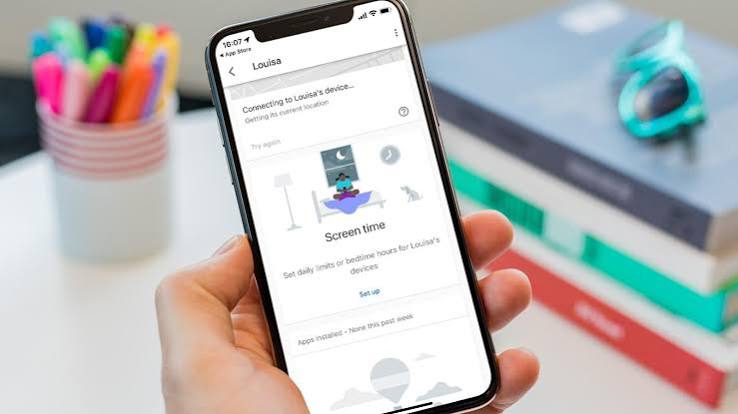
Apple’s Screen Time and Family Sharing tools are where I would look first on an iPhone or iPad. Android? Google Family Link does a similar job. A tablet used for games and video should have app approval, purchase controls, and downtime limits. And if your child is browsing, safe search and blocked installs belong on day one.
A practical path looks like this:
- List every device and account your child uses: phone, tablet, school laptop, game console, streaming app, email.
- Turn on the built-in family controls first, before adding third-party software.
- Require approval for app installs, in-app purchases, and account changes.
- Set limits for bedtime, homework, and weekends so the rules are predictable.
- Review the device together once a week at first, then taper to less frequent check-ins if things stay calm.
- Keep the explanation simple: “I’m checking for safety, not spying on your private feelings.” If you’re worried about anxiety, compulsive use, or self-harm, consult a pediatrician or licensed mental health professional and follow their advice.
At this age, messaging is something to supervise, not a private zone to vanish into. But if the device is already stirring up conflict, that is a sign to simplify, not pile on more. Fewer apps can beat more monitoring. Honestly, that trade-off is usually kinder anyway.
A generic article will tell you to “set boundaries.” That is useless unless the boundary is concrete. Concrete means the child knows what happens when, which apps are allowed, and what you will actually review.
Quick check: when your child is under 13, your best move is usually shared setup, approved apps, and regular visible review, not hidden surveillance.
If You Have a Teen, Monitor Patterns, Not Private Conversations
With a teen, reading every message is usually the wrong tool. Teens need room to build judgment, and they also need to know that serious risks still get noticed. The sweet spot is pattern monitoring: time online, new contacts, account privacy, location sharing, and changes in behavior.
For a phone, start with a clear agreement about what stays private and what does not. Private can mean journal-style thoughts, ordinary friend chat, and harmless memes. Not private can mean unknown adults, sexual content, bullying, threats, self-harm talk, or contact that breaks your house rules.
If you want a workable structure, use this sequence:
- Set the rule in plain language: “I will not read normal conversations, but I will check for safety risks if there’s a reason.”
- Review the privacy settings on the teen’s main apps together: who can message, who can comment, who can tag, who can see posts.
- Use account alerts and family features for login changes, new device sign-ins, and location sharing.
- Agree on a regular check-in time, like once a week, where your teen can show you anything that feels tricky.
- Define the red flags that trigger a deeper look: unknown adults, secret accounts, bullying, threats, sexual exploitation, or sudden withdrawal.
- Revisit the rules after a month. If trust is strong, loosen the controls; if problems show up, tighten only the part that failed.
I’d choose this approach because it protects dignity without pretending teens are always fine. It also gives you a way to step in when something real happens. If your teen already trusts you, a hidden monitoring app can do more damage than the threat you are trying to prevent.
Here is what many parents miss: teens often need coaching more than catching. Ask who they follow, what group chats they’re in, and what kinds of posts make them feel bad. Those conversations reveal more than a week of silent checking sometimes will.
If you need a place to start with rules and privacy basics, the Family Online Safety Institute and Common Sense Media both publish practical guidance for parents. I would also look at the FTC’s advice on children’s privacy and account security: https://consumer.ftc.gov/consumer-alerts/2023/01/keep-your-kids-safe-online
Quick check: when your child is a teen, you probably need a mix of privacy, check-ins, and alert-based monitoring, not constant message reading.
The Least Invasive Tools That Actually Help
Want to stay informed without hovering? Start with tools that show activity trends and safety settings instead of content. That is the key difference. Content monitoring reads messages. Trend monitoring tells you when the shape of use changes.
If you want the least invasive stack, I would build it in this order:
- Employ built-in parental controls from Apple Screen Time, Google Family Link, Microsoft Family Safety, or the console’s family settings.
- Turn on app-store approvals so new apps cannot appear without your say-so.
- Use router or DNS filters only if your child is younger or you need household-wide protection against adult content.
- Set bedtime and downtime limits so the device itself helps enforce the rule.
- Enable account alerts for password changes, new logins, and recovery email changes.
- Use location sharing if safety outside the home is the concern, but tell your child exactly when it is on and when it is off.
When you compare tools, ask three questions: Does this show content or only behavior? Can my child see it is on? Does it help me teach better habits, or only catch mistakes? I’d favor tools the child can see. Hidden software can create a short-term win and a long-term trust problem.
A lot of articles push “monitoring apps” as if they are all the same. They are not. A browser filter is not the same as a message reader. A screen-time limit is not the same as a keystroke logger. I would avoid any tool that tries to hide itself from the child or copies every word by default. The privacy cost is high, and the value is often lower than parents expect. No magic here.
For a more formal framing of online safety and youth privacy, the U.S. Children’s Online Privacy Protection Act guidance from the FTC is worth reading, as is guidance from your child’s school district if school-issued devices are involved. The FTC also explains that COPPA applies to children under 13, which is one reason device-level controls are often the starting point for that age group.
Quick check: when you want the lightest useful system, use built-in controls, alerts, and shared rules before you consider third-party monitoring software.
When the Standard Advice Is Wrong
A child who has already lied about online behavior changes the equation. The usual “trust and talk” advice may not be enough. But that does not mean total surveillance is the answer. If there has been deception around secret accounts, unsafe adults, explicit content, or repeated rule-breaking, then monitoring should be targeted, temporary, and explained.
Anxiety, neurodivergence, or compulsive scrolling can make a hard crackdown backfire. In that case, the better move is structure: fewer apps, clearer routines, and shorter review windows. Shared custody can also throw everything off; inconsistent rules between homes are a mess. If so, align the basics first: same bedtime, same app rules, same privacy expectations.
School devices are another exception. Those devices may be managed by the school, and your access may be limited or inappropriate. Ask the school what is monitored and what is not. Do not install private monitoring on a school-managed device without understanding the rules.
If your child is being bullied or groomed, stop treating “privacy” as the main issue. Safety comes first. Preserve screenshots, block the person, report through the app, and contact the school or local authorities if the threat is credible. If there is any sign of self-harm or abuse, involve a qualified professional right away.
A few scenarios where the normal advice changes:
- Secret account discovered → what changes: the issue is deception, not screen time → what to do instead: address the lie, reset device privileges, and add a review date.
- Child targeted by a stranger → what changes: immediate harm risk → what to do instead: preserve evidence, block, report, and tighten messaging access.
- Child with mental health concerns → what changes: the online pattern may be part of a bigger picture → what to do instead: coordinate with a clinician and keep monitoring focused on safety signals.
- Shared custody with different rules → what changes: inconsistency undermines enforcement → what to do instead: agree on a minimum common rule set.
- School laptop only → what changes: the school may control the device → what to do instead: ask about their management tools and keep your checks separate from school policy.
Quick check: when you are responding to deception, grooming, or a mental health concern, the answer shifts from “respect privacy” to “protect safety with a narrower, documented plan.”
How to Keep Privacy and Oversight in Balance
Say what you are checking, what you are not checking, and why. That one move does more than any app. Children can tolerate boundaries. Mystery is what they hate.
I would keep these rules:
- Tell your child the monitoring exists.
- Explain the purpose in one sentence.
- Review the rules before changing them.
- Use the least intrusive tool that solves the problem.
- Make stronger checks temporary, not permanent.
- Retire controls when the child shows they can handle more freedom.
If your child asks, “Why do you need to see that?” I’d answer plainly: “Because I am responsible for your safety, but I also want you to have private space.” That sentence draws a real line. It says privacy is not the same thing as secrecy.
It also helps to separate categories. I would usually keep these private: ordinary conversations with friends, harmless opinions, personal interests, and some age-appropriate social life. I would not keep these private: threats, exploitation, adult contact, self-harm content, or anything that breaks the family’s safety rules.
One mistake I see a lot is parents confusing trust with inaction. Trust is not the same as looking away. It is a plan that gives a child room to grow while making sure real danger is not invisible.
Quick check: when your child knows the rules, can explain them back, and still has room for privacy, you’re probably balancing oversight well enough.
FAQ
Should I read my child’s texts?
For a younger child or a real safety concern, maybe. For a teen with no red flag, I would not make message-reading the default. Start lighter.
Is screen time monitoring enough?
Not always. Screen time tells you how long, not who is contacting your child or what kind of content they are seeing.
What is the least invasive way to start?
Employ built-in parental controls, app approval, bedtime limits, and account alerts. Those give you useful oversight without reading private conversations.
Should I tell my child I’m monitoring?
Yes. Secret monitoring usually damages trust more than the risk you are trying to reduce.
What if my child refuses all monitoring?
If the child is younger, you still set the rules and use the device controls that come with the phone, tablet, or school-issued laptop. If the child is older, start with the least intrusive option and revisit the agreement after a week.