Last updated: August 11, 2026
Quick Answer: Most parental control apps work as layered guardrails, and the most useful ones cover 3 core jobs: screen time, content filtering, and app management.
Parental control apps turn a child’s phone, tablet, or computer into something far easier to see and manage. In practice, they can filter content, cap screen time, show app use, and sometimes track location. I write about family tech and device safety, and the question I hear most is not “Which app is best?” That question becomes this: what can these tools actually do, and where do they fall short?
Key Facts:
- Most families start with 3 controls: screen-time limits, content filters, and app approval.
- Network filters can lose coverage off home Wi‑Fi.
- Full monitoring shows more activity, but it also increases trust concerns.
- A child can often work around weak settings with a second browser, a guest account, or a VPN.
- Setup matters more than marketing because one forgotten browser can defeat a filter.
How Parental Control Apps Work in Real Life
The real value of a parental control app is not one magic setting. Instead, it is the stack of controls it adds on top of the device’s built-in tools. Most apps sit in one of three places: they run through the app store on the child’s device, they connect to an account the parent manages, or they use a router or network filter to control internet access at home.
Each path has limits. A phone app can usually see more about what happens on that phone. A network-based tool can block websites on home Wi‑Fi, but it loses power when the child switches to cellular data or another network. A desktop tool can manage browsers and installed software, but it may not fully cover a game console or a smart TV. Funny thing, really — the weakest link is often the one nobody checks twice.
So the best way to think about these apps is as guardrails. They help shape habits; they do not promise total control. A child who knows how to use a second browser, a guest account, a school-issued device, or a VPN can often work around weak settings. That is why setup matters more than marketing.
For a baseline for safe device use, I’d start with official guidance from the American Academy of Pediatrics and the Federal Trade Commission. Those sources won’t pick an app for you, but they explain the category well and help you understand where the real risks are.
The Features Every Parent Should Know Before Installing One
I’d sort parental control features into six buckets. If an app cannot do at least some of these well, it is usually not worth your time.
Content filtering. This blocks sites or categories such as adult content, gambling, self-harm, or violence. Helpful? Yes. Perfect? No. Filters can miss new sites or accidentally block harmless pages. A good filter reduces exposure; it does not replace supervision.
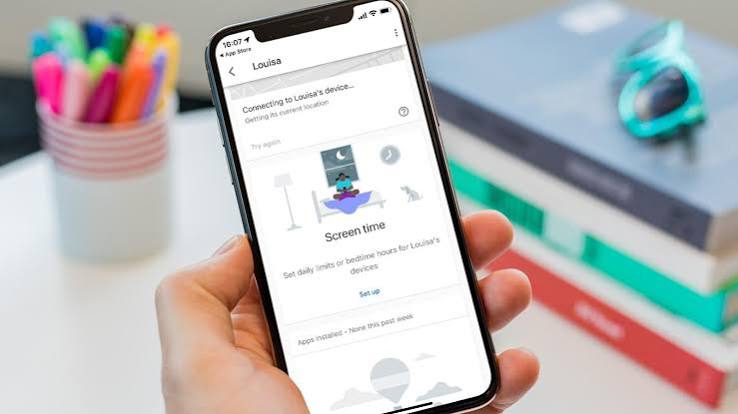
Screen time limits. These let you set daily limits, bedtime cutoffs, or app-specific time caps. This feature is most useful for routine problems: endless scrolling, late-night gaming, or “just one more video.” The drawback is obvious. Once limits are set too harshly, children look for workarounds or stop trusting the controls.
App management. Some apps let you approve downloads, block specific apps, or see how much time each app consumes. This is one of the most practical features because it targets the real attention hogs instead of the whole device. For example, a family can block a new game at 2 p.m. and approve it later if homework is done.
Location tracking. This can show where a phone is, alert you when a child arrives or leaves a place, and help in emergencies. It is valuable for younger kids and for after-school logistics. It also raises privacy concerns, so I’d use it with clear rules rather than silent monitoring.
Web and search history. These tools show what was browsed or searched. They can reveal patterns that filters miss. They also create the most trust issues if used as hidden surveillance. I think parents should be careful here and explain why they are checking.
Alerts and reports. Good apps send notifications for risky content, new downloads, limit overrides, or location changes. These reports are useful because they reduce guesswork. They are also easy to overuse; constant alerts can turn you into a dashboard manager instead of a parent.
For mobile safety standards and child privacy guidance, I also trust the Federal Communications Commission’s consumer pages and the National Center for Missing & Exploited Children for broader context on online safety.
The Real Difference Between Basic Controls and Full Monitoring
Basic controls and full monitoring are not the same thing, even when app marketing blurs the line. One changes what the child can do. The other shows more of what the child is doing.
Basic controls usually cover screen time, app blocks, web filters, and bedtime schedules. That is the right level for younger children, beginners, or families that want a light-touch setup. It works because it shapes behavior without turning every device check into an interrogation.
Full monitoring goes further. It may include text alerts, browsing activity, location history, social app oversight, and keyword alerts. That can help when a child is in a riskier stage: dealing with strangers online, poor judgment in group chats, or repeated rule-breaking. It can also backfire fast. More monitoring means more chances for the child to feel watched, and once that happens, they often move the activity to another device. Game over, basically.
My view is simple: basic controls win for day-to-day family life. Full monitoring wins only when there is a real reason to tighten the net. Without a specific concern, full monitoring often creates more conflict than safety.
Basic Controls: Who Should Actually Use This and Who Shouldn’t
Basic controls are the better choice for most families with younger children or for parents who mainly want structure. This is the setup I would choose first if the main problem is bedtime scrolling, accidental exposure to mature content, or too much gaming after homework.
Its biggest strength is clarity. A child understands the rule: the device stops at a certain time, certain apps stay closed, and some websites are off-limits. That kind of control is easier to explain and easier to enforce than hidden surveillance. It also tends to create less drama because the parent is not reading every message or checking every move.
But the weakness is bluntness. A child may still find age-inappropriate content through a browser loophole, a friend’s device, or a new app category you did not block. When the child is already hiding behavior, basic controls alone may not be enough.
I would skip basic controls as your only tool if your child is older, technically savvy, or already showing signs of risky online contact. In those cases, you may need more visibility or a different family agreement altogether.
Full Monitoring: The Specific Situations Where It Wins
Full monitoring wins in specific situations where the risk is concrete, not hypothetical. A child who is newly online, has repeatedly bypassed limits, is traveling alone, or has access to messaging apps that worry you may need more visibility.
Its main strength is context. You can see patterns, not just violations. You may notice that late-night use keeps happening after a certain app opens, or that a location alert catches a real safety issue instead of a missed pickup. When things go sideways fast, context matters.
The downside is trust. Full monitoring can feel invasive even when your intentions are good. It may also create false confidence. A parent can mistake visibility for protection, when a child can still lie, use another account, or move to a different device.
I would not start here for a child who simply needs better habits. I would also avoid it if the family is already in a trust crisis and no one has talked honestly about what will be monitored. That usually turns the app into a punishment tool, and punishment tools get resisted.
The Honest Side-by-Side
Next, here is the comparison I would use if I had to choose in one sitting.
| Criteria | Basic Controls | Full Monitoring | Winner for this condition |
|---|---|---|---|
| Screen time limits | Strong and simple | Usually included, but not the main value | Basic controls for routine use |
| Content filtering | Good for broad protection | Good, often paired with alerts | Tie for younger kids |
| App approval/blocking | Very useful | Very useful | Tie for download control |
| Location tracking | Sometimes included | Often more detailed | Full monitoring for travel or safety concerns |
| Message or activity visibility | Limited | Much greater | Full monitoring for risk review |
| Trust impact | Lower | Higher | Basic controls for family peace |
| Setup complexity | Easier | More time-consuming | Basic controls for fast setup |
| Risk of workarounds | Moderate | Still present, but harder to bypass | Full monitoring if the child is tech-savvy |
| Best age/use case | Younger kids, first device rules | Older kids, repeated boundary issues | Depends on problem |
The pattern is plain: basic controls are the cleaner choice for routine family management. Full monitoring is for situations where you need more detail because the stakes are higher or the behavior has already become a problem.
Our Verdict: Which One to Choose and Why
Choose basic controls if your main goal is screen-time structure, content filtering, and a calmer family routine. Choose full monitoring if you have a specific safety concern, repeated rule-breaking, or a child who keeps finding ways around simpler limits. Neither helps if you are hoping an app will replace conversation, supervision, or age-appropriate device rules.
That is the call I would make.
When the child is young, start with the lightest tool that solves the problem. It protects without turning the home into a surveillance room. For an older child and a real risk, not just convenience, use the more detailed option and say exactly why. In both cases, the parental control app should match the problem, not the other way around.
When to Reconsider This Choice Entirely
There are times when the answer is not “pick a stronger app.” It is “step back and rethink the setup.”
1. The child only uses a school-issued device.
You may have limited control, and a parental control app could conflict with school policies. Check with the school before installing anything.
2. The child uses multiple devices or shared accounts.
A phone app alone may not cover laptops, tablets, consoles, or browser-based workarounds. In that case, you may need a router-level filter, account-level controls, or a broader family tech plan.
3. Trust is already broken.
If the child feels spied on, the app can intensify the fight. I would slow down and set written rules first.
4. You need medical, legal, or safety guidance beyond normal parenting.
If the concern involves self-harm, exploitation, abuse, or serious compulsive behavior, do not rely on an app as the solution. Speak with a qualified professional and use the app only as one small part of the response.
What People Get Wrong About Parental Control Apps
The biggest mistake is thinking these apps are all-or-nothing safety systems. They are not. They are management tools, and management tools work best when the adult knows what problem they are solving.
The second mistake is buying the most intrusive option first. More monitoring does not automatically mean more safety. Sometimes it just means more noise, more conflict, and more chances for a child to route around the rules.
The third mistake is skipping the setup. A poorly configured filter, weak passwords, or a forgotten second browser can make an app look useless when the real issue is that it was never set up carefully.
I would choose the lightest tool that matches the risk, explain the rules plainly, and revisit the setup as the child gets older. That approach is less dramatic, but it is more durable.
FAQ
Do parental control apps block everything inappropriate?
No. They reduce exposure, but they do not catch every site, app, or workaround.
Can kids bypass parental control apps?
Sometimes, yes. The easier the app is to set up, the easier it may be to bypass if the child is determined.
Are parental control apps enough by themselves?
Usually not. They work best with house rules, device passwords, and ongoing conversations.
Should I tell my child I installed one?
I think yes, in most cases. Hidden monitoring can damage trust unless there is a serious safety reason and you have legal or professional guidance.
What feature matters most for most families?
Screen-time limits and app controls usually solve the most common problems first.