Last updated: August 11, 2026
- What I Would Do in the First 10 Minutes Overwhelmed?
- Instagram reports do not always show a visible outcome.
- How to Report Cyberbullying on Snapchat When Messages Vanish Fast Snapchat is tricky because messages disappear.
- Screenshot everything that shows the abuse, the account name, and the date.
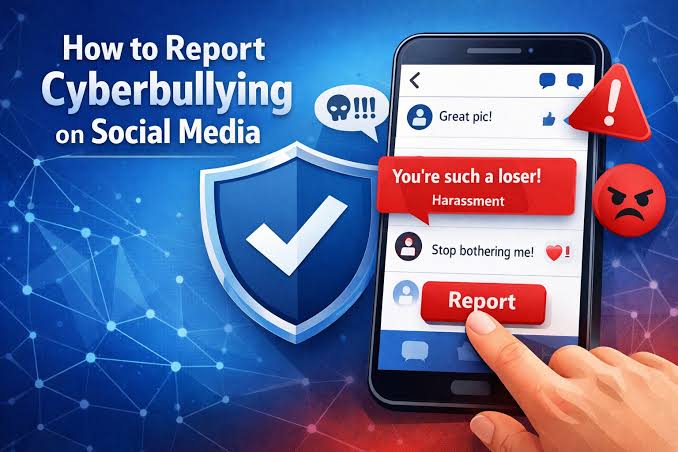
Quick answer: For how report cyberbullying on instagram, tiktok, snapchat, youtube, the fastest path is usually to report the post, comment, message, or account inside the app first, save evidence, then block and tighten privacy settings. Threats, private-image sharing, impersonation, or stalking across apps? Treat that as higher risk. Get a parent, school, platform support, or law enforcement involved depending on the risk; when you’re not sure, talk to a trusted adult or professional. According to the FBI, cyberstalking can be a federal crime, and the FTC warns that sextortion and image-based abuse often spread quickly.
Key facts
- Report the exact item first: comment, DM, story, reel, post, live chat, or profile.
- Save screenshots before you report, because content can disappear in minutes.
- Repeated, targeted, sexual, threatening, or impersonation-based abuse needs more than one step.
- Instagram, TikTok, Snapchat, and YouTube all have in-app reporting tools and Help Center guidance.
- When the bully is a real-world contact, document the pattern and involve a trusted adult or school contact when minors are involved.
- For severe cases, keep evidence in two places and use platform support plus outside help if needed.
Want the shortest version? Report first, save proof, then block and lock down your privacy. Simple. Should the person be threatening you, sharing private images, impersonating you, or stalking you across apps, I would treat it as more than “mean comments” and escalate to a parent, school, platform support, or law enforcement depending on the risk.
The Right First Move Depends on What Kind of Cyberbullying You’re Dealing With
A single nasty comment is one thing. Repeated harassment, impersonation, sexual content, threats, or a group pile-on is another. Very different.
Start with the content where it lives, keep the proof, and cut off access. That’s the rule I use. Skip the screenshots, and the post may vanish before anyone sees it. Skip the block and privacy step, and the same person can circle back like a bad smell.
| Situation | Best Path | Why Other Options Fail |
|---|---|---|
| One cruel comment or DM | Report the message/comment in-app, then block | Ignoring it can let the pattern continue; arguing usually feeds it |
| Repeated harassment from the same account | Report the account plus the worst posts/messages | Reporting one item may miss the pattern |
| Impersonation or fake account | Report as impersonation and gather screenshots of profile details | A normal “harassment” report may not be the right category |
| Threats, extortion, stalking, sexual images | Save evidence first, then report in-app and outside the app if needed | Waiting can destroy evidence and increase risk |
| Bullying from classmates or a known person | Report, document, and tell a trusted adult or school contact if minors are involved | Platform reports alone often do not stop offline escalation |
For parents, the job is a little different. Use the app’s report tools, yes; but also think about offline safety. If there are threats of violence, do not sit around waiting for a platform reply.
Quick check: Mild and one-off? Start inside the app. If it is repeated, targeted, sexual, threatening, or tied to a real person, treat it as an escalation, not just a complaint; when there’s any uncertainty, consult a trusted adult or professional and check the platform’s help pages.
How I Would Report Cyberbullying on Instagram
On Instagram, the first move is to report the exact item: the comment, message, story, reel, or profile. Different paths exist, and picking the wrong one can slow the whole process down.
Begin with the content itself. Open the comment and use the menu if it is a cruel remark. For a DM, go into the thread and report the message or the account. Stories and reels get reported directly from the post. And when the person is pretending to be you, file it as impersonation and attach screenshots that show the mismatch. Instagram’s Help Center explains the current flow, and Meta’s safety pages are the place to check for updates.
Use this order:
- Take screenshots of the post, username, date, and any replies before the person deletes anything.
- Open the comment, DM, story, reel, or profile and tap the report option.
- Choose the closest reason: harassment, bullying, hate, threats, impersonation, or sexual content.
- Block the account if you do not need to see anything from them.
- Set your account to private if strangers are involved, and review who can comment, mention, tag, or message you.
- If the bullying is coordinated, report multiple pieces of content, not just one comment.
When you are being dogpiled in comments, I would also limit who can comment for a while. Not surrender. Just closing the gate while the report is being reviewed.
Instagram reports do not always show a visible outcome. Annoying? Absolutely. Still, that does not mean the report was useless. If the abuse is serious, keep your screenshots and use Meta’s safety or support tools as well.
Quick check: Report the exact item if the abuse is inside Instagram. If the harassment is ongoing, block and lock down your settings the same day.
How to Report Cyberbullying on TikTok Without Losing the Evidence
TikTok has one big trap: people react fast and forget to document the video, comment thread, username, and profile. Then the post is gone. Poof.
I would handle TikTok in two tracks: save the evidence, then report through the app. TikTok’s Help Center is the best source for the current steps, and when you are unsure which category fits, consult the Help Center before you submit. For harassment in a comment thread, report the specific comment. For a video problem, report the video. And if the account keeps reappearing with fresh uploads, report the account too.
Use this workflow:
- Screenshot the video, comment, profile, and any duets, stitches, or reposts that show the bullying context.
- Save the direct link if you can, because that helps locate the item later.
- Open the video, comment, or profile and use TikTok’s report option.
- Pick the category that best fits the abuse: harassment, bullying, hate, self-harm encouragement, impersonation, or privacy violation.
- Block the account if it is directly targeting you.
- Review who can comment on your videos, message you, duet your content, or stitch it.
If the bullying is a public pile-on, I would not try to answer each person. That just feeds the fire and creates more copies. Report the worst content, block the accounts that keep escalating, and tighten comment controls.
When a private image, doxxing attempt, or threat to share something personal shows up, I would escalate outside TikTok too. That is not “just drama.” Save the evidence in multiple places, because platform moderation can take time and copied content can spread.
For platform help, TikTok’s Help Center is the place to look for the current report steps. Keep the video URL and screenshots as backup in case you need to show a parent, school official, or police officer what happened.
Quick check: Capture the evidence before reporting if the bullying lives in a TikTok video or comment thread. If the same person keeps coming back, report the account and cut off duets, stitches, and comments.
How to Report Cyberbullying on Snapchat When Messages Vanish Fast
Snapchat is tricky because messages disappear. Fast. So act before the evidence is gone. If someone is sending cruel snaps, threats, or sexual material, screenshot the message first if you can do so safely, then report it.
People often miss this part on Snapchat: one snap is not always the whole problem. When the harassment comes through a chat thread, a story, a spotlight post, or a friend request, report the exact place where it happened.
Here is the sequence I would use:
- Capture screenshots or screen recordings of the snap, chat, story, username, and any profile details before opening a long back-and-forth.
- Use Snapchat’s reporting tools on the snap, chat, story, or account.
- Block the sender if they are not a trusted contact.
- Remove them from your friends list if they already had access.
- Change who can contact you, view your story, and see your location.
- If the content is threatening, sexual, or involves extortion, tell a trusted adult or local authorities right away.
If the bullying is happening through Snap Map or location sharing, turn that off. I would not leave location visible while trying to “see what they do next.” That gives a bully more to work with.
Another thing people miss: when the harassment is from someone at school, saving the screenshots matters even more. School staff usually need concrete proof, not “he was being mean on Snapchat.” A screenshot with the name, date, and context is much easier to act on.
Snapchat’s own safety pages and reporting tools can change, so I would use the current in-app report flow and the Help Center rather than relying on old screenshots of the menu.
Quick check: Save it immediately if the harm is on Snapchat; it may disappear. If the person has access to your chats or location, remove that access before waiting for a reply.
How to Report Cyberbullying on YouTube for Videos, Comments, and Live Chats
YouTube can get messy in a hurry: video comments, community posts, live chat, shorts, or even a whole channel built around mocking you. The right move depends on which part is doing the damage.
One comment? Report the comment. A video aimed at you? Report the video. Ongoing harassment from a channel? Report the channel and save examples of the worst material. In a live stream chat, report that specific chat or stream while it is happening.
I would use this order:
- Screenshot the video title, channel name, comment text, date, and URL.
- Open the comment, video, live chat, or channel and use YouTube’s report option.
- Choose the most accurate reason: harassment, privacy violation, impersonation, hate, or threats.
- If the channel keeps targeting you, block the user so you do not see their content again.
- Turn on stricter comment filters on your own channel if you manage one.
- Escalate to YouTube support or trust-and-safety channels if the issue is repeated and severe.
If someone posts your private information, I would not wait to see whether the video “gets traction.” That kind of material can spread fast; honestly, it can go feral. A removal request matters more than a social-media argument.
Creators have a slightly different problem set. You may need to moderate comments, hide abusive users, and review live chat settings in addition to reporting. If you are not a creator, you can still block and report, but keep the links in case the material resurfaces on another channel. YouTube’s Help Center and Google’s safety pages are the right place to check for current reporting steps.
Quick check: Identify the exact object causing harm on YouTube: comment, video, live chat, or channel. Then report that piece, not just the person’s general account.
The Edge Cases Where the Standard Advice Breaks Down
Odd case? The usual “just report it” advice can fall apart. These are the moments where I would switch gears.
-
Situation: The bully uses a throwaway account and keeps returning.
What changes: Blocking one account is not enough.
What to do instead: Report every new account you can connect to the same behavior, tighten privacy settings, and keep a dated log of the repeated pattern. -
Situation: The bullying includes threats of violence or self-harm.
What changes: This is no longer just a platform problem.
What to do instead: Save evidence, report in-app, and contact a trusted adult, school official, crisis line, or law enforcement depending on immediate risk. If there is immediate danger, call emergency services. -
Situation: The content is private, intimate, or sexual.
What changes: The priority is containment, not conversation.
What to do instead: Do not negotiate with the poster. Preserve evidence, report for privacy or sexual content, and ask for help from a parent, guardian, or trusted adult if you are under 18. -
Situation: The bully is in your school, club, or family circle.
What changes: Offline access matters.
What to do instead: Screenshot everything, report in-app, and bring the evidence to the school or another responsible adult if needed. -
Situation: The account is impersonating you.
What changes: The report should focus on identity theft/impersonation, not just rudeness.
What to do instead: Collect proof of your real profile, report the fake account, and ask friends not to interact with it. -
Situation: You are not sure whether it “counts” as cyberbullying.
What changes: You do not need to prove a legal category before acting.
What to do instead: If a person is repeatedly humiliating, threatening, baiting, or exposing you online, save the evidence and report it.
Quick check: Anonymous, sexual, threatening, or tied to real-life access? Standard blocking is too small a response.
What I Would Do in the First 10 Minutes
Overwhelmed? Use this sequence and do not overthink it.
- Screenshot everything that shows the abuse, the account name, and the date.
- Open the exact post, comment, snap, message, or video.
- Report the specific item in the app.
- Block the account.
- Tighten privacy and comment/message settings.
- Tell one trusted person if the bullying is ongoing, sexual, threatening, or tied to someone you know.
The mistake I see most often is waiting to “see if it stops.” That delay can cost you the evidence. The second mistake is reporting the account only and skipping the content. The content is usually what moderation systems can review fastest.
I would also keep one folder for screenshots, URLs, and notes. It does not need to be fancy.